Back office
One place to run your shop: products, stock, prices, your team and your devices. Works on a laptop, and just as well on your phone.
Starts from your kind of shop
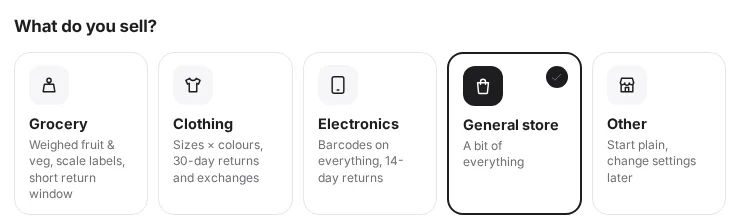
Pick grocery, clothing, electronics or a general store when your shop is set up. Weighed items, sizes and colours and the return window start to match, and every setting can be changed later.
- Grocery, clothing, electronics, general
- Sensible settings to start with
- Change anything later
A setting for everything
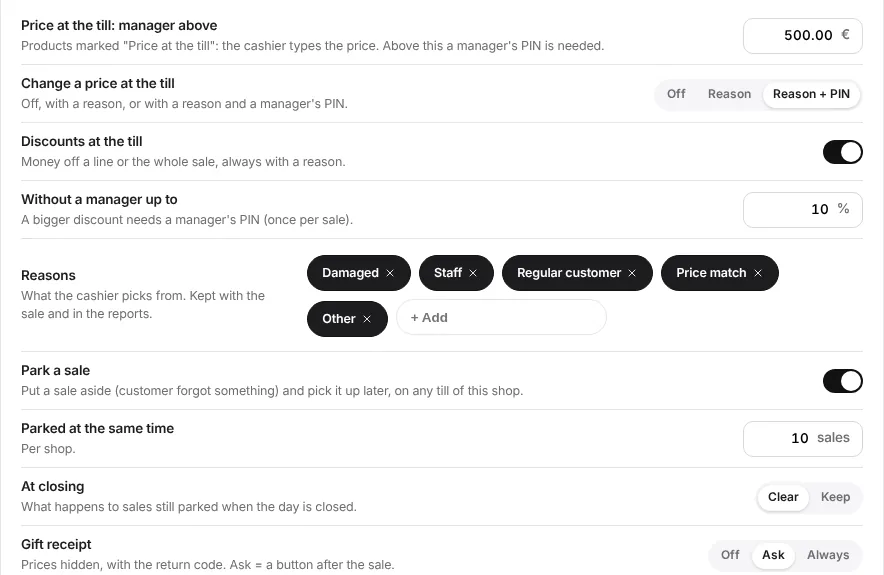
Till rules, returns, gift cards, deals, labels and printers. Every feature is off until you switch it on.
- Every feature is a setting
- Off by default
- Change any time
Your team
Decide who can refund, close the day or change prices. Owners, managers and staff each see what they need.
- Ready-made roles you can adjust
- A till PIN per person, and a lock after each sale if you want
- Invite people with a link on WhatsApp, no email needed
Who did what
The Team page shows who works here, what they can do and who did what. Every person has their own login.
- Activity per person
- Own login for everyone
Pair devices with a code
Open the till on any screen and enter its code in the back office. Rename or unpair any time.
- No accounts on devices
- As many tills as you need
- Rename or unpair any time
Help from inside the app
Open a chat from the back office or the till and talk to the servi team. The conversation keeps its context.
- Chat from any device
- Keeps the context of your shop
- Rate the help afterwards
More features
Reports
Gross profit per day, margins by category and brand, dead stock and stock value, per shop.
Learn more ›Accounting & branches
Daily sales, VAT and payments for your bookkeeper. Every shop in one view.
Learn more ›Hardware for shops
Scanners, scales, receipt and label printers. iPads print with no extra box.
Learn more ›Ready when you are.
Tell us about your shop and we'll show you servi with your own products.